| Statistic | Formula | Comparison |
|---|---|---|
| RSS | actual vs predicted | |
| MSS | ∑(y^−yˉ)2\sum (\hat{y} - \bar{y})^2 | predicted vs mean |
| TSS | ∑(y−yˉ)2\sum (y - \bar{y})^2 | actual vs mean |
# Residual Sum of Squares (RSS)
Info
- measure of how good the model approximates the data (measures model error)
- Residuals are the differences between the observed data values and the least squares regression line
- Calculated by: Residual = Observed – Predicted
- They represent the error!! (Sum of all the point to line distances)
- Graphically, residuals are the vertical distances between the observed values and the line
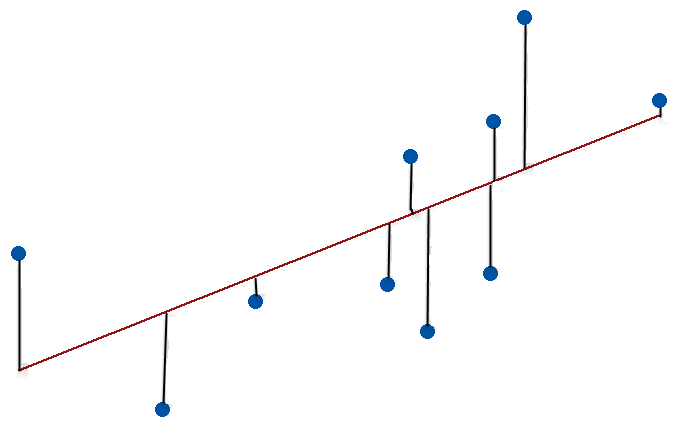 (hence its the lines from pts to line)
Formula:
- = actual observed value of the response (dependent variable) at point
- = predicted value from the regression model
Code
Adding on Residual line segments to a plot
yhat = fitted(spruce.lm) #fitted: returns the predicted values of the dependent variable
segments(ddt$BHDiameter, #x_1
    	 ddt$Height, #x_1
    	 ddt$BHDiameter, #x_2
    	 yhat #y_2
    	 )
#segments esentially adds drawn line ontop of current graph, #so we have base pt to predicted point (line to point)
Direct residuals calculation
residuals(object..) #OR
resid(...)
#extracts model residuals from objects returned by modeling functions
Ordinary Least Squares Regression
- method of constructing a good model
- Aka Line of best fit, minimizes the RSS
Code:
linear_reg = with(ddt, lm(y~x)) #to obtain a line (non graph), y~x is y related to x
#we can use abline(linear_reg) ontop of an existing plot to add this line on
Formula (not impt)
- = residual (the error at point )
- = squared residual (penalizes larger errors more heavily)
- = summation across all data points
model sum of squares (MSS)
Same base formula:
But:
- predicted value of the dependent variable
- mean of the dependent variable
Code:
- Mean of Y versus X i.e. mean of Height vs BHDiameter, deviations of the fitted line from the mean height added. (MSS=model sum of squares)
- We didn’t include fitted line but its from OLSR code
segments(ddt$BHDiameter, #x_1
         mean(ddt$Height),  #y_1
         ddt$BHDiameter,
         yhat, # yhat = fitted(linear_reg) # predicted value from the regression model
         )
abline(h=mean(ddt$Height)) # see abline
total sum of squares (TSS)
NOTE
- RSS + MSS = TSS- Sum of squared differences between the observed dependent variables and the overall mean
- observed dependent variable
- mean of the dependent variable
Code
Plot mean of Height versus BHDiameter + show total deviation line segments
segments(ddt$BHDiameter,#x_0
         ddt$Height, #y_0
         ddt$BHDiameter, #x_1
         mean(ddt$Height),#y_1, notice we dont use mean here!!
         )
Other code parts:
Scatter Plot w/ trend line etc
trendscatter(x~y,
    		 f=0.5, #smoothness of curve
    		  data=ddt)
Linear Model
lm(...)
#  carry out regression,
#ex:
lm.D9 <- lm(weight ~ group)
Plot points
plot(Height~BHDiameter,bg="Blue",#circle colour
                pch=21, #circle width
                cex=1.2, #size of points
                ylim=c(0,1.1*max(Height)), #axis limits from 0 to 10% above the max Height
                xlim=c(0,1.1*max(BHDiameter))# vise versa
                )
Abline()..
abline(h = mean(y))  # horizontal line
abline(v = 5)                  # vertical line at x = 5
abline(a = 2, b = 0.5)         # line y = 2 + 0.5*x
abline(lm(y~x, data=ddt)) #takes LoBF in en plot ontop of cur graph